Free resources
Practical tools for your Microsoft Entra ID projects
Drawn from my client work, ready to use in your environment. Free, no strings attached.
Identity Pulse
A health check of your Entra ID tenant, in a few minutes.
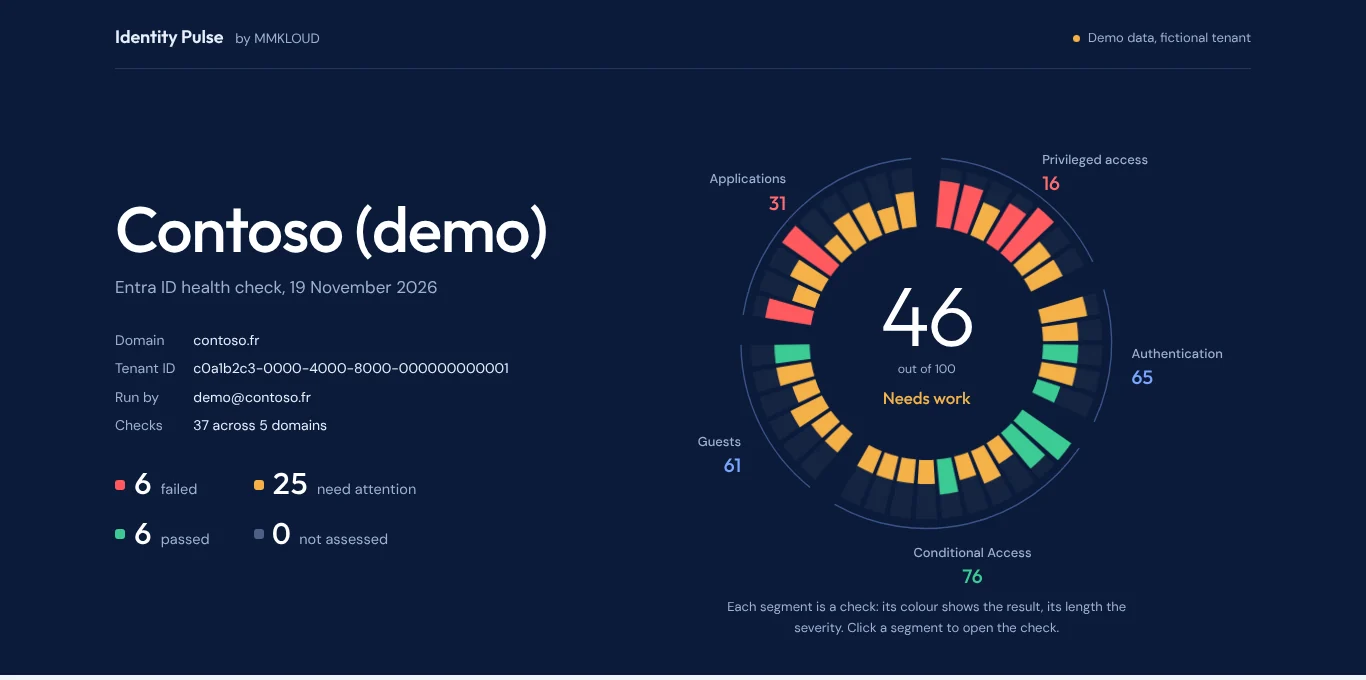
Identity Pulse reads your tenant configuration and produces a clear report: a score out of 100, the priorities to address and, for each check, the finding, why it matters and how to fix it.
- 37 checks across 5 domains
- Read-only: nothing is changed in your tenant
- Nothing leaves your computer: the report is a local HTML file
- Report in English or French
What the tool checks
Every check is based on Microsoft guidance and on what I see in the field.
- Privileged access and PIM7 checks
- Authentication5 checks
- Conditional Access10 checks
- Guests and external collaboration6 checks
- Applications and consent9 checks
Next version : Identity Protection, identity governance, AI agents, tenant settings, hybrid and hygiene.
Get Identity Pulse
- Confirm your address by clicking the link in the email.
- Download the tool and run it in PowerShell 7 with a Global Reader account.
- Open the report : score, priorities and fixes, in a few minutes.
Requirements
- PowerShell 7 and the Microsoft.Graph.Authentication module
- An account with the Global Reader role (no admin role needed)
- An administrator's consent to the read permissions, the first time
- Entra ID P1 or P2 for some checks: without the licence, they simply show as "Not assessed"
Your data: MMKLOUD uses your address to send you the tool and, if you agree in the form, news from MMKLOUD. It is managed with Brevo, a French email provider, and is never sold. You can unsubscribe at any time with the link in every email, or ask for its deletion at contact@mmkloud.fr.
An Entra ID or cloud security project?
Let's talk about your context and priorities.